
TimeOffCalendar vs Vacation Tracker: A Comparison for Individuals and Couples
Vacation Tracker is a solid team leave management tool built for Slack. But if you're an individual or couple trying to plan personal PTO, it's the wrong tool. Here's why.
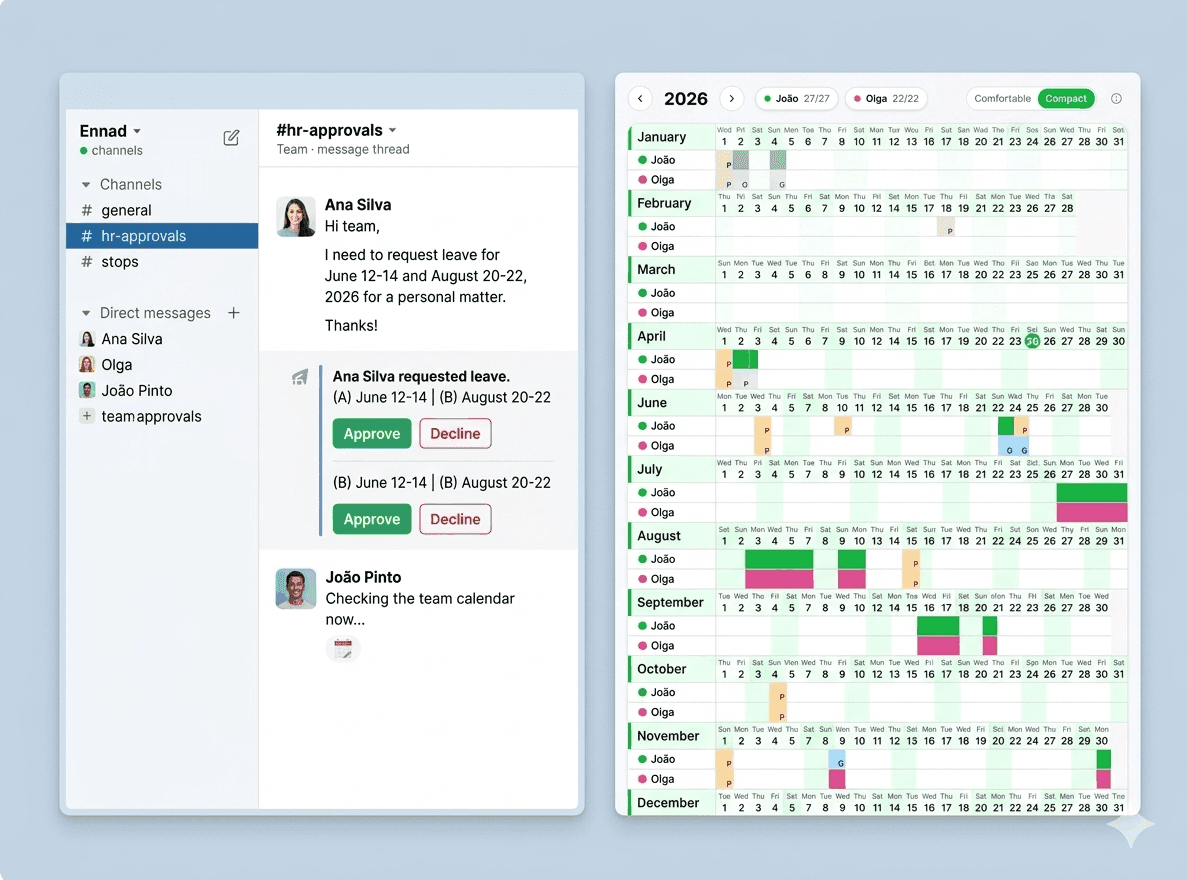
Vacation Tracker is a popular leave management app that lives inside Slack and Microsoft Teams. It lets teams request time off, get approvals, and see who's out, all without leaving the chat tool they're already in.
For a team of 10–100 people, it works well. But if you're an individual trying to track your own PTO, or a couple trying to see when you're both free for a vacation. Vacation Tracker is built for a completely different problem.
This comparison breaks down where Vacation Tracker shines, where it falls short for personal use, and why TimeOffCalendar is a better fit for individuals and couples.
PTO Planning for You and Your Partner
TimeOffCalendar is free for individuals. No Slack required, no IT admin, no per-seat pricing. Just your time-off calendar, with the option to share with your partner.
What Vacation Tracker Is Built For
Vacation Tracker was built to solve a specific team problem: managing leave requests across a group of employees without requiring a full HRIS.
It handles:
- Leave requests and approvals: employees request time off, managers approve or decline in Slack/Teams
- Team absence overview: see who's out on a given day or week
- Leave policy management: different accrual rules, carry-over settings, blackout dates
- Slack/Teams notifications: automated reminders and daily digest messages
For small-to-mid teams, especially those already using Slack heavily, it's a clean solution that reduces back-and-forth on time-off requests.
Why Vacation Tracker Doesn't Work for Personal PTO Planning
1. It requires a Slack or Teams workspace
Vacation Tracker is a Slack and Microsoft Teams integration. To use it, you need an active Slack or Teams workspace, which means either a company account or paying for one yourself.
TimeOffCalendar is a standalone web app. No Slack required. Open your browser and you're in.
2. It's priced per seat, per month, for a team
Vacation Tracker's pricing starts at $1 per user per month (billed annually) with a minimum of about $25/month. For a couple, paying a team tool's per-seat minimum for 2 people doesn't make sense, especially when TimeOffCalendar's couples plan is $5/month with no minimum seat count.
3. No personal year-at-a-glance view
Vacation Tracker shows you a team calendar: who's off when, as a list or timeline. It's not designed to help you personally see the whole year, spot long weekend opportunities, and strategically place your limited PTO days.
TimeOffCalendar is built around the year view. You see the entire year at once: your days off, your partner's days off, public holidays for each of you, all in a single readable grid.
4. Your partner can't join unless they have a Slack account on the same workspace
Coordinating time off with a partner via Vacation Tracker would require them to be on the same Slack workspace as you. If they work at a different company (which is usually the case), this simply isn't possible.
With TimeOffCalendar, you invite your partner with an email. They create a free account and your calendars are linked. That's it. No shared workplace, no IT approval needed.
5. No public holiday intelligence
Vacation Tracker can display public holidays, but it doesn't help you use them strategically. It won't show you that taking 4 days off in late May turns Memorial Day into a 9-day break. It won't highlight the gap between Christmas and New Year's Day that could be bridged with 3 PTO days.
TimeOffCalendar gives you public holidays for 190+ countries, per person. The year-at-a-glance view makes it obvious where those strategic opportunities are.
Feature Comparison
| Feature | Vacation Tracker | TimeOffCalendar |
|---|---|---|
| Requires Slack or Teams | ✅ Yes, required | ❌ No, web app, any browser |
| Year-at-a-glance personal view | ❌ Team timeline only | ✅ Full year personal grid |
| PTO allowance tracking | ✅ Yes (team-managed) | ✅ Yes (self-managed) |
| Couple coordination (across companies) | ❌ Same workspace required | ✅ Core feature |
| Public holidays per person | ⚠️ Team-level only | ✅ Per person, 190+ countries |
| Leave request & approval workflow | ✅ Yes | ❌ Personal planning only |
| Overlap detection for couples | ❌ Not applicable | ✅ Auto-highlighted |
| Strategic long weekend planning | ❌ No planning surface | ✅ Visual year grid |
| Price for 1 person | ~$25/month minimum | Free forever |
| Price for 2 people (couple) | ~$25/month minimum | $5/month or $20/year |
When Vacation Tracker Makes Sense
Vacation Tracker is a good choice if:
- You manage a team of 5+ people and need leave approvals built into Slack
- Your whole team uses Slack daily and wants time-off requests handled there
- You need absence tracking at the team level, not personal PTO planning
- You have an HR function that manages leave policies across multiple employees
For those use cases, Vacation Tracker is genuinely useful. It removes friction from the leave request process inside Slack.
The Honest Verdict
Vacation Tracker and TimeOffCalendar are solving different problems for different audiences.
Vacation Tracker → team leave management inside Slack
TimeOffCalendar → personal PTO planning and couple coordination
If you're an individual employee, a freelancer, or part of a couple trying to plan vacations together, TimeOffCalendar does what Vacation Tracker was never designed to do, at a fraction of the cost, with no Slack account required.
| Use case | Best tool |
|---|---|
| Team leave requests via Slack | Vacation Tracker |
| Manager approval workflows | Vacation Tracker |
| Personal PTO tracking | TimeOffCalendar |
| Coordinating time off with a partner | TimeOffCalendar |
| Strategic planning around public holidays | TimeOffCalendar |
| Year-at-a-glance vacation planning | TimeOffCalendar |
Track PTO Without the Team Overhead
TimeOffCalendar is free for individuals and $5/month for couples. No Slack, no admin, no minimum seat counts. Your time-off calendar, your way.
Frequently Asked Questions
Can I use Vacation Tracker without Slack or Microsoft Teams?
No. Vacation Tracker is built as an integration for Slack and Microsoft Teams. It cannot be used as a standalone web app.
My company uses Vacation Tracker. Can I also use TimeOffCalendar personally?
Yes, they serve completely different purposes. Use your company's Vacation Tracker to request and log approved leave. Use TimeOffCalendar to plan strategically: see your whole year, track your balance, and coordinate with your partner.
Does TimeOffCalendar have approval workflows?
No. TimeOffCalendar is a personal planning tool, not a team leave management system. There are no request or approval flows. You mark your own days off and manage your own allowance.
TimeOffCalendar is free to try, takes 2 minutes to set up, and doesn't require a Slack account. Give it a go.
Related Articles
- Best 5 Vacation Trackers in 2026: Ranked and Reviewed
- TimeOffCalendar vs Google Calendar: Which Is Better for Tracking PTO?
- TimeOffCalendar vs BambooHR: Which Is Right for Tracking Your PTO?
- Is a Premium PTO Tracking Tool Worth the Cost? An Honest Analysis
- How to Maximize Your PTO in 2026: A Strategic Guide for US Workers