
TimeOffCalendar vs Google Calendar: Which Is Better for Tracking PTO?
Google Calendar is great for meetings, but it was never built for PTO. Here's why TimeOffCalendar beats it for couples and individuals tracking time off in 2026.
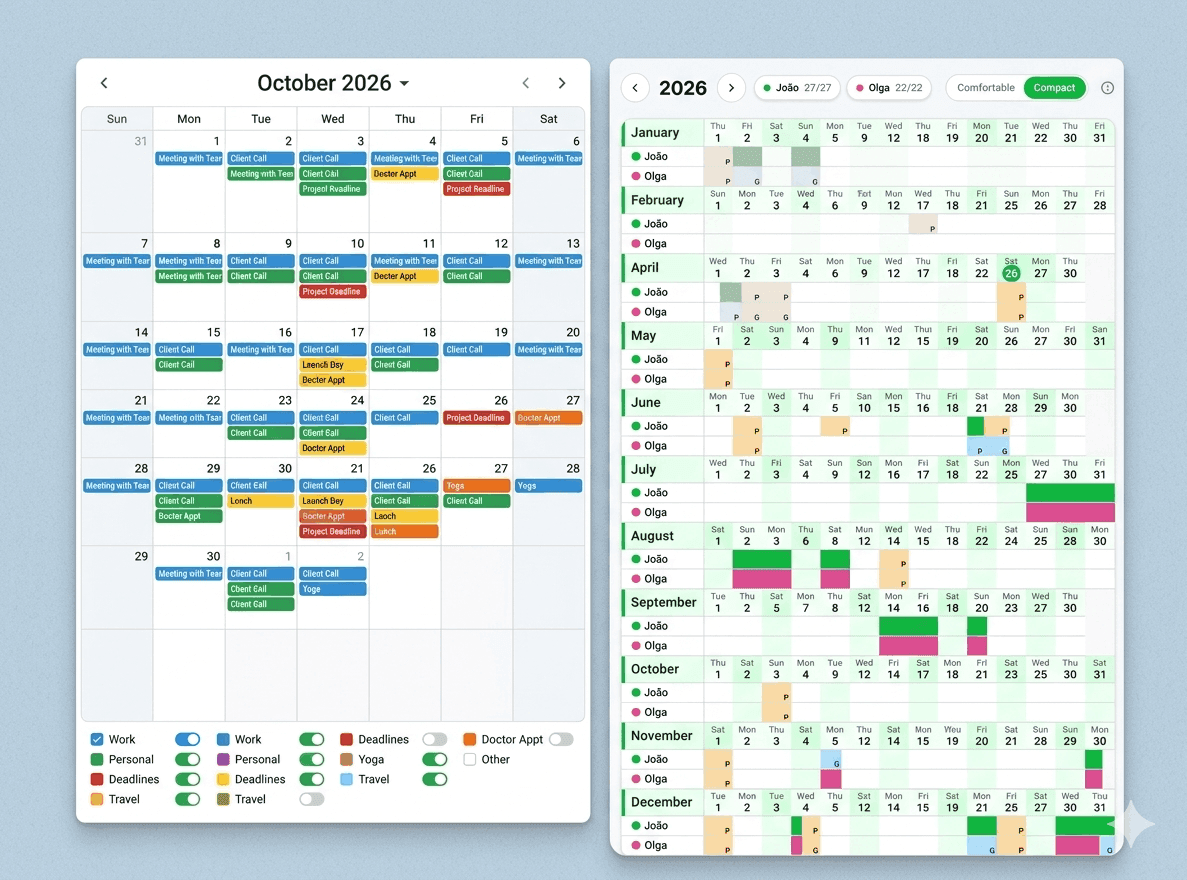
If you're tracking your PTO in Google Calendar, you're not alone, and you're probably frustrated.
Google Calendar is an excellent tool for scheduling meetings, appointments, and reminders. But when it comes to planning time off strategically, it falls short in ways that compound every year. Especially if you're coordinating with a partner who works somewhere else.
This article breaks down the real differences between Google Calendar and TimeOffCalendar for PTO tracking, so you can decide which actually fits your needs.
Try TimeOffCalendar Free
See your whole year at a glance. Track your PTO allowance, add public holidays, and coordinate with your partner, free for individual use.
The Core Problem with Using Google Calendar for PTO
Google Calendar was designed around events: things that happen at a specific time, with a start and end. It was never designed to answer questions like:
- How many PTO days have I used this year?
- When are my partner and I both off at the same time?
- Which public holidays apply to my partner's job vs. mine?
- What's the best way to bridge a gap between a holiday and a weekend?
You can work around these limitations with labels, separate calendars, and careful manual entry. But it's a hack, not a solution.
Feature Comparison
| Feature | Google Calendar | TimeOffCalendar |
|---|---|---|
| Year-at-a-glance view | ❌ No (month/week only) | ✅ Yes, full year grid |
| PTO allowance tracking | ❌ Manual counting | ✅ Automatic (used / remaining) |
| Public holidays auto-added | ⚠️ One calendar, same for all users | ✅ Per person, 190+ countries |
| Overlap detection (couples/teams) | ❌ Visual only, no highlight | ✅ Overlaps highlighted instantly |
| Calendar sharing for time off | ⚠️ Share full calendar (includes meetings) | ✅ Share only time-off data |
| Company-specific days off | ⚠️ Manual entries only | ✅ Built-in per person |
| Long weekend planning | ❌ You figure it out manually | ✅ Visual gap spotting |
| Price for 1 person | Free | Free forever |
| Price for couples/sharing | Free (but clunky) | $5/month or $20/year |
| Built for time off specifically | ❌ General calendar | ✅ Purpose-built |
Where Google Calendar Falls Short
1. No allowance counter
You get 15 days PTO this year. You use 3 days in February, 4 days in May. How many days do you have left in August?
With Google Calendar, you manually count every event you've tagged as PTO, assuming you remembered to tag them consistently. With TimeOffCalendar, this is automatic. Mark a day off, and your remaining balance updates instantly.
2. Sharing means sharing everything
When you share your Google Calendar with your partner to coordinate time off, they also see your dentist appointment, your team standup, and every meeting you've ever created. There's no way to share only your time-off data.
TimeOffCalendar shares exactly what you want to share: the calendar of days off. Nothing else.
3. Public holidays are one-size-fits-all
Google Calendar lets you subscribe to a country's public holidays. But if you and your partner live in different countries, work for employers that observe different holidays, or have company-specific days off. You have to maintain separate holiday calendars and mentally reconcile them.
In TimeOffCalendar, each person sets their own country and company days. You see your partner's public holidays clearly marked on the shared calendar, color-coded by person. No mental gymnastics.
4. No year-at-a-glance view
Google Calendar's best view is "month". To plan a strategic year, you need to spot every bridgeable gap between a public holiday and a weekend. That means seeing the whole year at once.
TimeOffCalendar shows you the full year in a single grid. Every public holiday, every marked day off, every potential long weekend is visible at once. It's the difference between planning and guessing.
5. Overlap detection requires manual effort
Want to know when you and your partner are both off at the same time? In Google Calendar, you overlay two calendars and squint at the colors. In TimeOffCalendar, days where both people are off are highlighted automatically. It's the whole point of the tool.
When Google Calendar Is Enough
To be fair, Google Calendar is perfectly fine if:
- You work alone and don't coordinate time off with anyone
- You don't track your PTO allowance (unlimited PTO, or you just don't care)
- You only need to remember which days you're off, not how many you've used
- You never want to plan strategically around public holidays
If any of those are true, Google Calendar works. It's free and you probably already use it.
But if you've ever said "wait, did you book that week?" to your partner, or realized in November you had 8 PTO days left to use before they expire. Google Calendar is not the right tool for the job.
The Verdict
| Use case | Best tool |
|---|---|
| Scheduling meetings & appointments | Google Calendar |
| Reminders, invites, video calls | Google Calendar |
| Tracking your PTO allowance | TimeOffCalendar |
| Coordinating time off with a partner | TimeOffCalendar |
| Planning long weekends strategically | TimeOffCalendar |
| Managing public holidays per person | TimeOffCalendar |
Google Calendar and TimeOffCalendar aren't really competing for the same use case. Google Calendar is for your workday. TimeOffCalendar is for your time away from it.
Stop Tracking PTO in the Wrong Tool
TimeOffCalendar is purpose-built for what Google Calendar was never designed to do. Free for one person. Upgrade to share with your partner.
Frequently Asked Questions
Can I import my Google Calendar events into TimeOffCalendar?
Not directly. TimeOffCalendar is focused on time-off days, not general events. You'd mark your time-off days in TimeOffCalendar separately. Google Calendar sync is on our roadmap.
Can I use both tools together?
Absolutely. Many users keep Google Calendar for day-to-day scheduling and use TimeOffCalendar specifically for PTO planning and year-at-a-glance visibility.
Is TimeOffCalendar free?
Yes. The solo plan is free forever. You get your own year calendar, public holidays for 190+ countries, and PTO tracking at no cost. The Pro plan ($5/month or $20/year) unlocks calendar sharing so you can invite your partner or team.
Ready to stop counting PTO days on your fingers? TimeOffCalendar takes 2 minutes to set up and is free to try.
Related Articles
- Best 5 Vacation Trackers in 2026: Ranked and Reviewed
- How to Maximize Your PTO in 2026: A Strategic Guide for US Workers
- How to Maximise Your Annual Leave in 2026: The Ultimate UK Guide
- TimeOffCalendar vs Apple Calendar: Which Should You Use for PTO?
- 5 Common Public Holiday Tracking Mistakes (And How to Avoid Them)