
TimeOffCalendar vs Apple Calendar (iCal): Which Should You Use for PTO?
Apple Calendar is elegant and deeply integrated into iOS, but it was built for appointments, not vacation planning. Here's how it stacks up against TimeOffCalendar for tracking PTO.
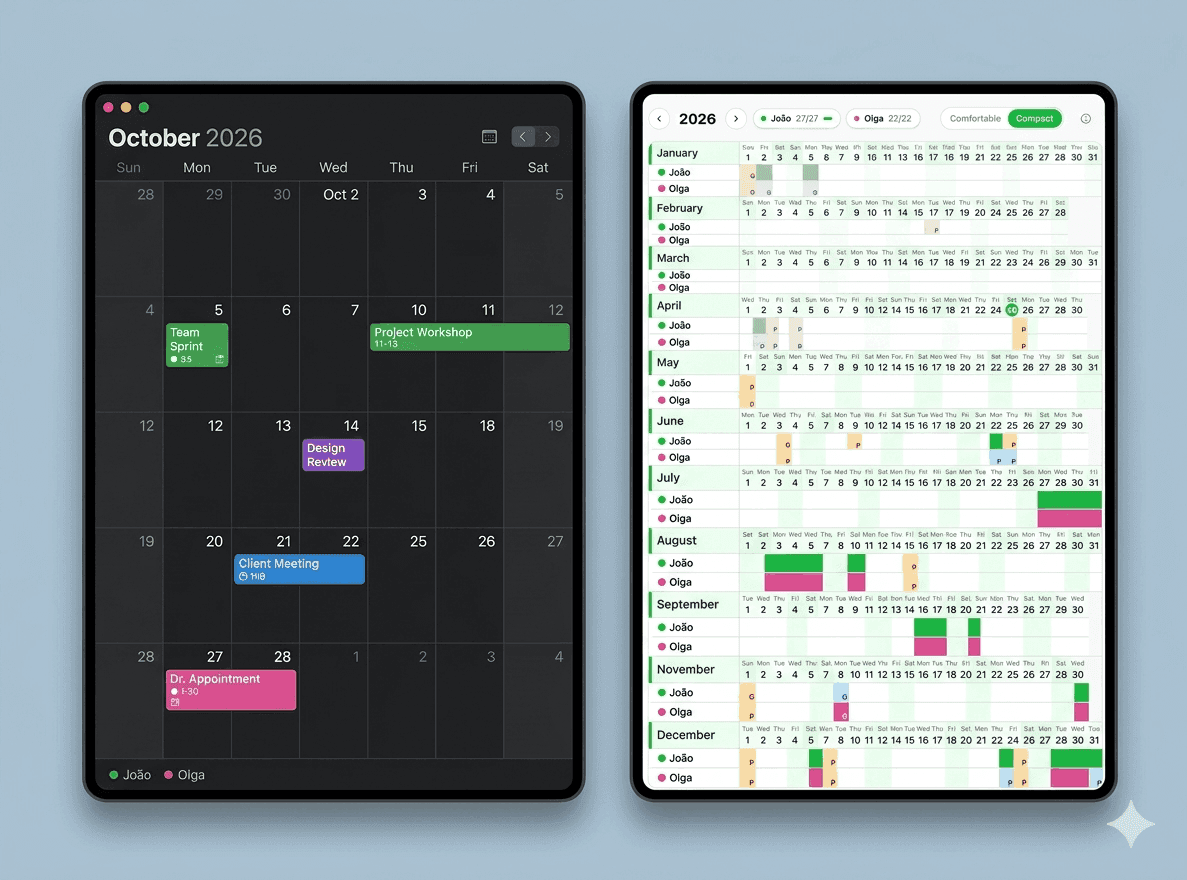
Apple Calendar (sometimes still called iCal) is a beautifully designed tool that comes built into every iPhone, iPad, and Mac. If you're in the Apple ecosystem, you've probably been using it for years.
But if you're using it to track your PTO and coordinate time off with a partner, you're fighting against a tool that was never designed for that purpose.
This article compares Apple Calendar and TimeOffCalendar head-to-head for the specific task of personal PTO planning and couple coordination.
Plan Your Time Off Smarter
Free for one person. Track your PTO allowance, see public holidays for your country, and share your calendar with your partner, without sharing your entire schedule.
What Apple Calendar Does Well
Apple Calendar excels at:
- Syncing across all your Apple devices: seamless iPhone, iPad, Mac, Watch integration
- Integration with other apps: Siri, Reminders, Maps, FaceTime
- Shared family calendars: via iCloud Family Sharing
- Clean, minimal UI, especially on iOS
- Importing public holiday calendars: via subscribed calendar feeds
These are real strengths. If you're scheduling dentist appointments, family birthdays, or syncing with your partner's social plans, Apple Calendar is excellent.
Where Apple Calendar Falls Short for PTO
The moment you try to use Apple Calendar for time-off planning specifically, its limitations become apparent.
1. No PTO allowance tracking
Apple Calendar has no concept of a "day budget". You can mark days as events, but it will never tell you how many PTO days you've used this year or how many you have left. That requires an external spreadsheet or mental arithmetic, both of which are error-prone.
TimeOffCalendar tracks your allowance automatically. Set your total, mark days off, and your remaining balance updates in real time.
2. Apple-only ecosystem
If you and your partner don't both use Apple devices, or if you share a calendar with someone who uses Android or Windows, you're limited. Apple Calendar's native sharing works best within the Apple ecosystem.
TimeOffCalendar is a web app. It works on any device, any OS, any browser. Your partner on Android can use it just as well as you on iPhone.
3. Shared calendar = shared everything
iCloud Family Sharing lets you share a calendar, but it shares everything on that calendar: appointments, reminders, all of it. There's no way to share only your time-off days without also exposing your full personal or work schedule.
With TimeOffCalendar, you share only what matters for coordinating time off. Your meetings stay private.
4. Public holidays are blunt instruments
You can subscribe to a public holiday calendar in Apple Calendar, but it's one subscription per country, and it applies to the whole calendar. If you work for a UK employer and your partner works for a US employer, you'd need two separate holiday calendars and manually reconcile them visually.
TimeOffCalendar assigns public holidays per person. You can each set your own country. When you look at the shared calendar, each person's holidays are clearly shown, color-coded by person, not merged into an undifferentiated list.
5. No year view
Apple Calendar's views are day, week, month, and year, but the year view is just a navigation aid, not a usable planning surface. You can't see your PTO, holidays, and partner's time off all at once in a single readable grid.
TimeOffCalendar is designed around the year view. The entire year is visible at once, with color-coded day types and instant overlap detection.
Feature Comparison
| Feature | Apple Calendar | TimeOffCalendar |
|---|---|---|
| Year-at-a-glance view | ⚠️ Navigation only, not actionable | ✅ Full year planning grid |
| PTO allowance tracking | ❌ Not available | ✅ Automatic counter |
| Public holidays per person | ❌ Per calendar, not per person | ✅ Per person, 190+ countries |
| Overlap detection | ❌ Manual visual comparison | ✅ Auto-highlighted |
| Cross-platform sharing | ⚠️ Best on Apple devices | ✅ Any device, any OS |
| Time-off-only sharing | ❌ Shares full calendar | ✅ Only time-off data |
| Company-specific days off | ⚠️ Manual entries | ✅ Built-in per person |
| Long weekend gap spotting | ❌ No guidance | ✅ Visual planning surface |
| Price for 1 person | Free (with Apple device) | Free forever |
| Price for couples/sharing | Free (but limited) | $5/month or $20/year |
When Apple Calendar Is the Right Choice
Apple Calendar makes sense for PTO if:
- You only need to remember which days you're off, not track a balance
- You're the only person involved, no partner or team coordination
- You're already deep in the Apple ecosystem and want frictionless sync with Siri, Reminders, etc.
- You use unlimited PTO and don't think about planning strategically
For simple bookmarking of days off, it works. For strategic planning and couple coordination, it doesn't.
The Real Difference: Purpose
Apple Calendar was built to manage your schedule. TimeOffCalendar was built to help you and your partner get the most out of your limited time off.
Those are different goals, and the tools reflect that. You wouldn't use a hammer to drive a screw. Both are useful tools, just for different jobs.
Built for PTO, Not Appointments
TimeOffCalendar does one thing well: help you plan your time off together. Free for one person, simple to share with your partner.
Frequently Asked Questions
Does TimeOffCalendar sync with Apple Calendar?
Not currently. Apple Calendar sync is on our roadmap. For now, TimeOffCalendar is your dedicated time-off planning tool, while Apple Calendar handles your day-to-day schedule.
Can I use TimeOffCalendar on my iPhone?
Yes. TimeOffCalendar is a responsive web app that works on all devices. Open it in Safari on iPhone or Chrome on Android. The experience is the same.
Do both partners need Apple devices to share calendars?
For Apple Calendar sharing via iCloud, the experience is best when both partners use Apple devices. For TimeOffCalendar, there are no device requirements. Any browser works.
Your time off is too valuable to track in a tool that doesn't understand what PTO is. Give TimeOffCalendar a try. It takes 2 minutes to set up and is free for solo use.
Related Articles
- Best 5 Vacation Trackers in 2026: Ranked and Reviewed
- TimeOffCalendar vs Google Calendar: Which Is Better for Tracking PTO?
- TimeOffCalendar vs BambooHR: Which Is Right for Tracking Your PTO?
- How to Maximize Your PTO in 2026: A Strategic Guide for US Workers
- Why a Specialized PTO Calendar Makes Travel Planning Easier