
Why a Specialized PTO Calendar Makes Travel Planning Easier
General calendars weren't built for vacation planning. A specialized PTO calendar changes how you spot opportunities, book trips, and make the most of your time off.
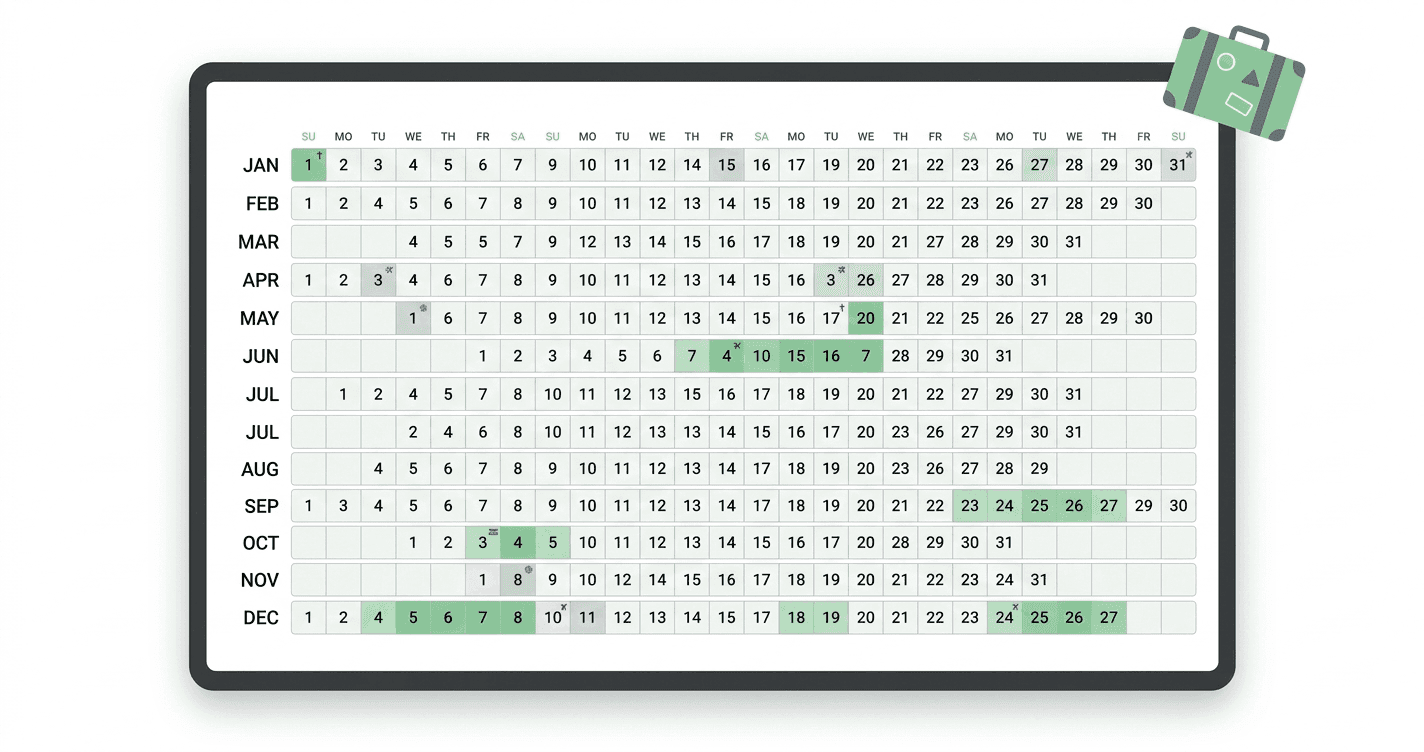
Planning a trip usually starts the same way: you open your calendar, try to find a window that works, realize you can't clearly see your public holidays, try to remember how many PTO days you have left, and eventually just pick a week that looks empty and hope for the best.
It's a poor process for a high-stakes decision. Time off is a finite resource. Travel costs money, requires coordination, and has real lead time. A vague planning process produces vague results: last-minute bookings, missed opportunities, and an annual sense that you didn't quite get enough out of your vacation days.
A specialized PTO calendar changes this. Here's how.
Plan Your Next Trip Around Your Calendar
TimeOffCalendar shows your full year at a glance, with public holidays, PTO balance, and partner availability. Free to start.
What Makes a Calendar "Specialized" for PTO?
A general calendar (Google Calendar, Apple Calendar, Outlook) was designed to manage your schedule: appointments, meetings, reminders, events. Time off can be added to these calendars, but it's an afterthought. The tool is optimized for adding events, not for planning around the absence of them.
A specialized PTO calendar is designed around a different question: how do you make the most of your limited days off? That requires a different set of features:
- A year view that shows all 365 days at once, not just the current month
- Automatic public holiday loading so you don't have to manually enter national holidays
- A PTO balance counter so you always know how many days you have left
- Overlap detection so you can see when you and your partner are both available
- A surface optimized for spotting gaps and opportunities, not logging appointments
The difference is the same as between a road map and a GPS navigation app. Both involve maps. One is built for planning from a distance. The other is built for managing an active journey. For PTO planning, you need the map.
How a Year View Changes What You See
The single biggest advantage of a specialized PTO calendar is the year-at-a-glance view. It sounds like a cosmetic difference. It isn't.
When you look at a full year at once, a specific class of opportunity becomes visible that is completely invisible in a month view: bridgeable gaps.
A bridgeable gap is a window where a public holiday falls close to a weekend, and a small number of PTO days could turn it into a significantly longer break.
| Scenario | Public holiday day | PTO days needed | Total days off |
|---|---|---|---|
| Holiday falls on Monday | Mon | 0 (already extended weekend) | 3 |
| Holiday falls on Tuesday | Tue | 1 (bridge Monday) | 4 |
| Holiday falls on Thursday | Thu | 1 (bridge Friday) | 4 |
| Holiday falls on Wednesday (mid-week) | Wed | 2 (Mon + Tue or Thu + Fri) | 5 |
| Two holidays in same week | Mon + Thu | 3 (Tue + Wed + Fri) | 9 |
The 9-day break in the last row, achieved with just 3 PTO days, is a real opportunity that exists in most countries every 2-3 years when public holidays cluster. But you'll only see it if you're looking at the whole year at once.
In a month view, you see one holiday. In a year view, you see the pattern.
The Travel Planning Workflow with a Specialized Calendar
Here's what changes when you move from a general calendar to a purpose-built one:
Step 1: Load public holidays automatically
In a general calendar, you subscribe to a country's holiday calendar. It may or may not match your employer's observed holidays. If you and your partner are in different countries, you're managing two separate subscriptions and manually reconciling them.
In TimeOffCalendar, you set your country (and region where applicable) and the public holidays load automatically, per person. If your partner is in a different country, their holidays appear on the shared calendar too, color-coded separately.
Step 2: Scan the year for high-value windows
With the full year visible, you scan for clusters: places where holidays fall near weekends, where two holidays are close together, or where there are quiet periods in the calendar (fewer conflicts, better travel value).
This takes about 10 minutes at the start of the year. It would take an hour or more with a month-by-month view, which is why most people don't do it.
Step 3: Check your PTO balance before committing
A PTO balance counter tells you exactly how many days you have to work with. You can plan a 9-day break knowing you need 3 PTO days for it, leaving 17 for the rest of the year.
Without a balance counter, you're guessing. The guesses are often wrong in both directions: some people over-commit early and run out, others hoard days and lose them at year-end.
Step 4: Check partner or household availability
If you're planning a trip with a partner, the critical question is: when are you both free? A shared calendar with overlap detection answers this immediately. Days when both of you are off are highlighted automatically. You don't need to cross-reference two separate calendars.
Step 5: Book with confidence
Once you've identified the window, confirmed you both have the days available, and checked your balance, booking the trip is a simple decision. The uncertainty that usually surrounds travel booking (will this work? do we have enough days?) is already resolved.
Travel Planning Scenarios Where This Makes a Real Difference
Scenario: Making the most of a mid-week holiday
Your country has a public holiday on Thursday, May 14th. In a general calendar, you see the holiday and nothing else. In a year view, you immediately see that taking Friday the 15th as a PTO day gives you a 4-day weekend (Thu-Sun). Taking Monday the 11th as well gives you a 6-day break using only 2 PTO days.
You can book a short trip with confidence. Without the year view, this opportunity gets noticed too late to book flights at a reasonable price.
Scenario: Coordinating a trip with a partner who has different holidays
Your partner has a bank holiday on a Monday in August. You don't. In a general calendar, this creates confusion: is this a shared long weekend or not? In a shared PTO calendar, you see immediately that your partner has Monday off and you don't. You book one PTO day to match it, creating a shared 3-day weekend.
Scenario: Planning a longer trip around a holiday cluster
Two public holidays fall in the same week in May: one on Monday, one on Thursday. In a year view, you see immediately that 3 PTO days (Tuesday, Wednesday, Friday) would give you a 9-day break for the price of 3 days. You plan a longer international trip, book early, and get better prices.
Scenario: Year-end planning to avoid losing days
In October, you realize you have 8 PTO days left and the year ends December 31st. Your calendar shows you when those days fit most usefully, which holiday periods still have good bridging opportunities, and what you need to take to avoid losing them at year-end.
Why This Matters More If You're a Couple
Solo travelers can plan intuitively. They have one calendar, one balance, and full control.
Couples face a coordination problem. Two people have different balances, potentially different public holiday schedules, and competing constraints. The joint decision of "when should we travel?" is a negotiation, not a solo choice.
A shared PTO calendar converts that negotiation into a conversation about preferences rather than a puzzle about logistics. You both look at the same calendar. You both see the same opportunities. You both see each other's constraints. The question becomes "do we want to take this window?" not "is this window even possible?"
| Planning question | Without shared PTO calendar | With shared PTO calendar |
|---|---|---|
| When are we both free? | Manual cross-reference of two calendars | Overlapping days highlighted automatically |
| How many days do we each have left? | Check separately, communicate the numbers | Visible together on the same view |
| What's the best window this quarter? | Each person's opinion, reconciled verbally | Both look at the same year view together |
| Does this trip fit our combined budget? | Spreadsheet or guess | Both balances visible side by side |
Frequently Asked Questions
Do I need a specialized calendar if I already use Google Calendar for everything?
You can use Google Calendar for PTO tracking, but you'll work around several limitations: no balance counter, no year view for planning, no per-person public holiday logic, and no couple overlap detection. For simple bookmarking of days off, Google Calendar works. For strategic travel planning, a purpose-built tool is meaningfully better.
Can I use TimeOffCalendar for travel planning if my partner is in a different country?
Yes. Each person sets their own country and the public holidays are loaded per person. You see each other's holidays on the shared calendar, which is the core feature for international couples planning travel together.
Is it worth switching tools just for travel planning?
If you take more than 2-3 trips per year, or if you've ever lost PTO days at year-end, or if you and a partner have struggled to find shared windows: yes. The setup takes about 5 minutes and the planning benefit compounds over the year.
How far in advance should I plan trips around public holidays?
For flights and accommodation, 3-6 months gives you the best prices. That means your year-view planning ideally happens in January for most of the year's opportunities. High-demand periods (Christmas, summer peak, Easter) benefit from even longer lead times.
The best trips come from good planning. Good planning requires seeing what's actually in front of you, all 365 days of it, with your balance, your partner's availability, and your public holidays visible at once.
See Your Whole Year in One View
TimeOffCalendar loads your public holidays automatically, tracks your balance, and shows your partner's availability alongside yours. Free to start.
Related Articles
- Best 5 Vacation Trackers in 2026: Ranked and Reviewed
- TimeOffCalendar vs Google Calendar: Which Is Better for Tracking PTO?
- How to Maximize Your PTO in 2026: A Strategic Guide for US Workers
- How to Maximise Your Annual Leave in 2026: The Ultimate UK Guide
- The Real Impact of Strategic Time Off Scheduling